
Guide
How to fix a photo that won’t upload for online passport renewal
Online renewal needs a JPG, PNG, HEIC or HEIF photo between 54 KB and 10 MB. Fix a file that is too large, too small or the wrong format.
Published November 11, 2026

Check the file type and size first
The online renewal application accepts photos saved on your phone or computer. When a photo will not upload, the file type or size is often the problem. Check them in this order.
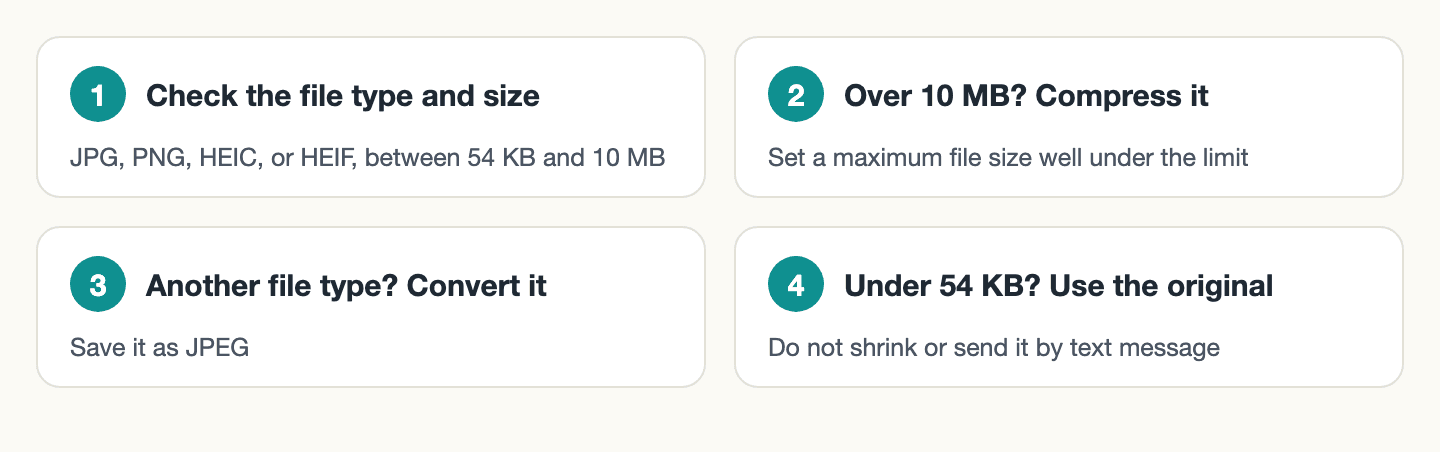
A photo saved at full size from a high-resolution phone camera can go over 10 MB, as in our test below. Sending a photo by text message can lower its quality, so use the original file from the device that took it.
What does the photo file need to be?
| Item | Requirement |
|---|---|
| File type | JPG, JPEG, PNG, HEIC, or HEIF |
| File size | Between 54 KB and 10 MB |
| Color and age | In color, taken in the last 6 months |
| Background | Plain white or off-white, without shadows, texture, or objects |
| Edits | No filters or retouching that change your appearance |
| Size in pixels | No fixed size. You can reposition or crop the photo in the application |
iPhone photos saved as HEIC are accepted as they are. You only need to convert photos in other formats, such as WebP.
How to bring the file within the rules
If the photo is over 10 MB, compress it with a size limit
Add the photo to Image Compression and turn on "Set a maximum file size". Enter a number well under the limit in "Maximum size", such as 5000 (the unit is KB, so this is about 5 MB), and press "Compress". When "Within target" appears under the image, save it with "Download".
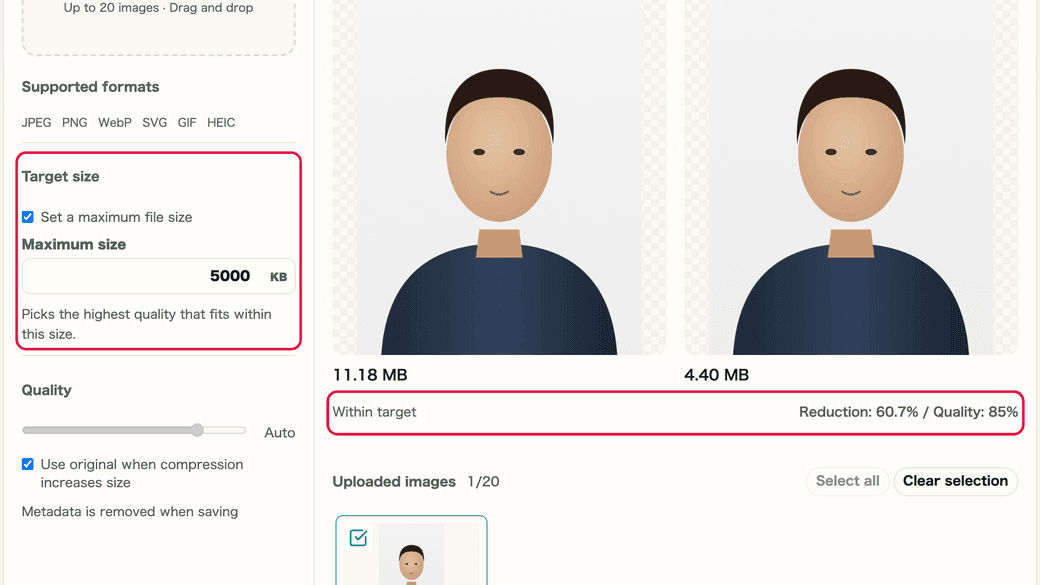
The tool picks the highest quality that fits within the size you enter If the photo is another file type, convert it to JPEG
Add the photo to Image Format Conversion, choose "JPEG" in "Output format", and press "Convert". Check that the size shown under the result is 54 KB or more, then save it.
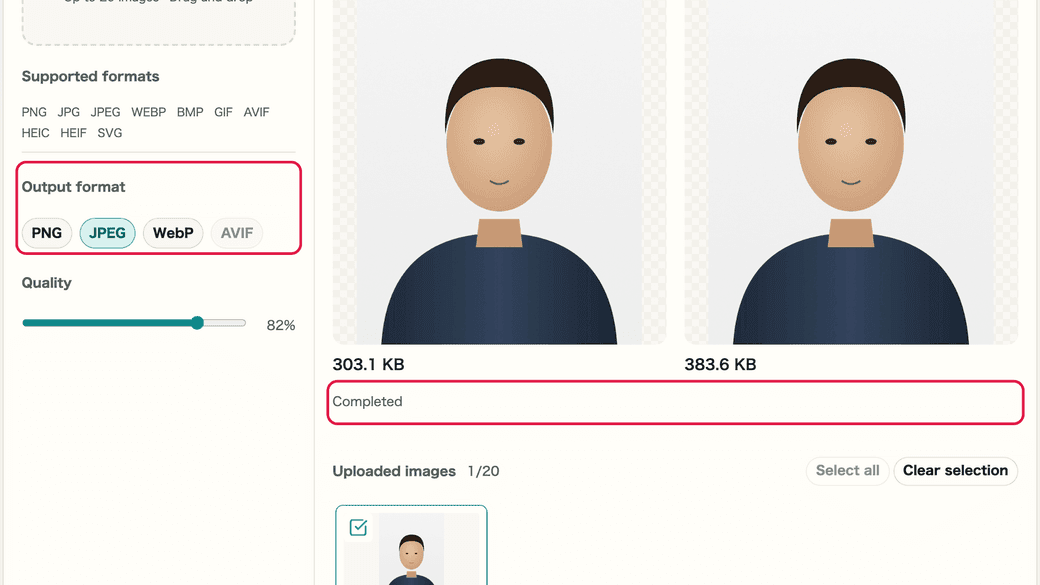
A WebP photo was saved as JPEG If the photo is under 54 KB, go back to the original
Enlarging a small photo does not bring back detail, and the photo may be rejected for being blurry. Use the original file from the phone or camera that took it, or ask the person who sent it to share the original file instead of a text message.
How large do the files end up?
We used a drawing of a person in front of a white background, saved at the size of a photo from a 48-megapixel phone camera (6048 × 8064 pixels), in place of a real photo.
| What we did | File size | Within 54 KB to 10 MB? |
|---|---|---|
| Original photo (6048 × 8064) | 11.18 MB | No, over 10 MB |
| Compressed with a maximum of 5000 KB | 4.40 MB (quality 85%) | Yes |
| WebP photo converted to JPEG | 383.6 KB | Yes |
| Resized down to 600 × 800 | 19.8 KB | No, under 54 KB |
Compressing with a maximum size brought the file under 10 MB while keeping a high quality. Resizing it down to 600 × 800, on the other hand, made it smaller than 54 KB. Plain backgrounds compress well, so be careful not to make the photo too small.
File sizes depend on what is in the photo, so use these numbers as a guide.
Official guidance
| Source | Details | Checked |
|---|---|---|
| U.S. Department of State, "Uploading a Digital Photo" | The photo must be a JPG, JPEG, PNG, HEIC, or HEIF file between 54 KB and 10 MB, in color, and taken in the last 6 months. You can reposition or crop the photo in the application. Do not use filters or retouching, do not take a photo of a printed photo, and do not send the image by text message. | 2026-11-11 |
| U.S. Department of State, "Passport Photos" | Unacceptable photos are the number one reason applications are put on hold. Use a plain white or off-white background free of shadows, and submit the original, unedited photo without filters or digital changes. | 2026-11-11 |
Where people get stuck
- Shadows, a background that is not white or off-white, and glasses cannot be fixed by compressing or converting. Take a new photo.
- Apps that remove the background or smooth your skin change the photo itself, which the rules do not allow. The tools on this site only change the file size and format, not your appearance.
- A scan or photo of a printed photo lowers the quality and is not accepted. Use a photo taken directly with a camera or phone.
- Compressing a photo that is already small makes it smaller. Only compress photos that are over 10 MB.
Will the photo be accepted if the file meets the rules?
Not necessarily. The file type and size are only part of the requirements, and the photo is reviewed by the U.S. Department of State. We did not upload the photo to the application, so this guide follows the published guidance.
If your photo is not accepted after you apply, you will receive a letter or email asking for a new photo.
Is your image sent anywhere?
No. Many handy online services first send your file to their own computers before working on it. The tools on this site don’t send your image anywhere. All the work happens on your phone or computer, so no one, including the people who run this site, can see your image.
Only if you agree to cookies, we record which tool you used, how many files you handled and whether you saved them, to improve the site. We don’t record file names or what’s in the files.
Summary
For online renewal, the photo file only needs to be a JPG, JPEG, PNG, HEIC, or HEIF file between 54 KB and 10 MB. You can crop the photo inside the application, so you do not need to resize it to an exact pixel size.
If the file is over 10 MB, compress it with a maximum file size. If it is under 54 KB, go back to the original photo instead of enlarging it. Background, lighting, and expression cannot be fixed afterward, so retake the photo if those are the problem.
Before you send it
- The file is JPG, JPEG, PNG, HEIC, or HEIF
- The file size is between 54 KB and 10 MB
- The photo is in color and was taken in the last 6 months
- The background is plain white or off-white with no shadows
- No filters, retouching, or background removal were used
Related
Read and use next
Image Format Conversion
Convert PNG, JPEG, WebP, BMP, GIF, AVIF, HEIC, and SVG directly in the browser.
Convert the photo to JPEG with Image Format Conversion
Make an ID photo meet upload requirements
We turned an iPhone photo (3.17 MB) into a 1200 × 1200 JPEG of 229.4 KB, within a 240 KB limit.
Read the guide