
Guide
How to upload documents to the IRS Document Upload Tool from your phone
The IRS Document Upload Tool takes JPEG, PNG, or PDF files up to 15 MB each. 12 phone photos made a 46.90 MB PDF; compressed first, it was 11.14 MB.
Published November 11, 2026 · Updated November 27, 2026

Keep each file under 15 MB and upload up to 40 files
When an IRS notice or letter, such as CP05A, asks you for documents, you can send them online with the IRS Document Upload Tool (formerly called the Documentation Upload Tool) instead of mailing them. Open it from the link or QR code in your notice, and prepare the files in this order.
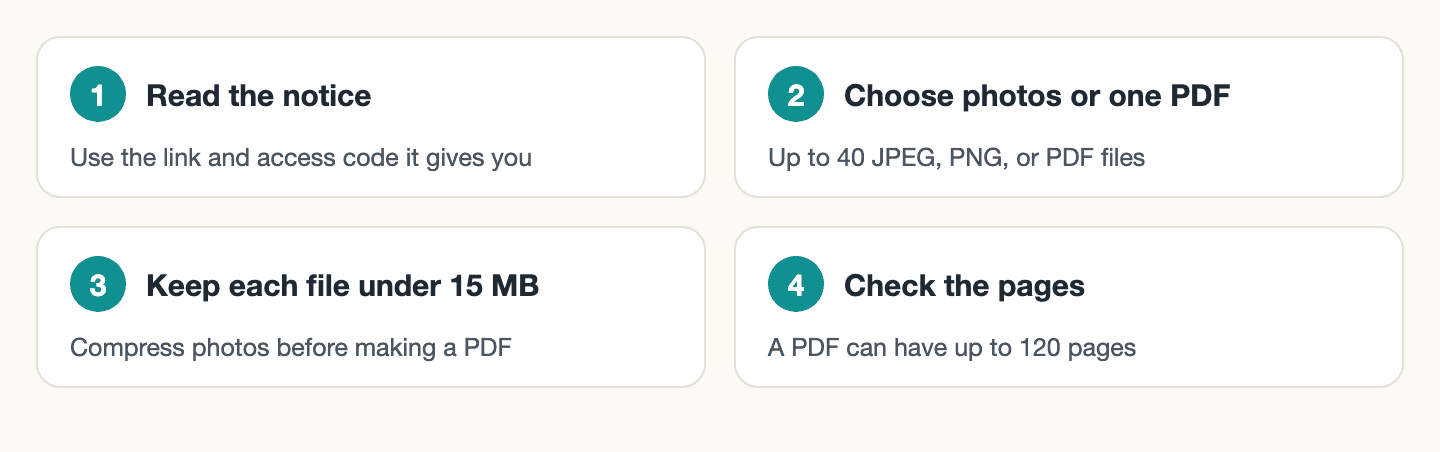
You can upload photos of each page as they are, or combine them into one PDF. One PDF keeps the pages together in order, but a PDF of many large photos can go over the 15 MB limit.
What does the IRS accept?
| Item | Limit |
|---|---|
| File types | JPEG, PNG, or PDF (scans, photos, or digital copies) |
| File size | Up to 15 MB per file |
| Number of files | Up to 40 files |
| Pages | Up to 120 pages per PDF |
| Access | The access code in your notice. If there is no access code, enter the notice or letter number instead |
| File names | Avoid special characters such as ! in file names, or the tool may show an error |
The tool is only for documents the IRS asked for in a notice or letter. You cannot file a tax return with it, and documents that need a physical signature cannot be sent this way. Follow the instructions in your notice.
How to prepare the files
Photograph each page
Place each page on a flat surface in good light and take a photo from straight above, so the whole page and all the text are visible. If you only need a few pages, you can upload these photos as they are.
Compress the photos to about 1 MB each
Add all the page photos to Image Compression and turn on "Set a maximum file size". Enter 1000 in "Maximum size" (the unit is KB) and press "Compress". When "Within target" appears, the photo fits. Zoom in to check that the text is still easy to read.
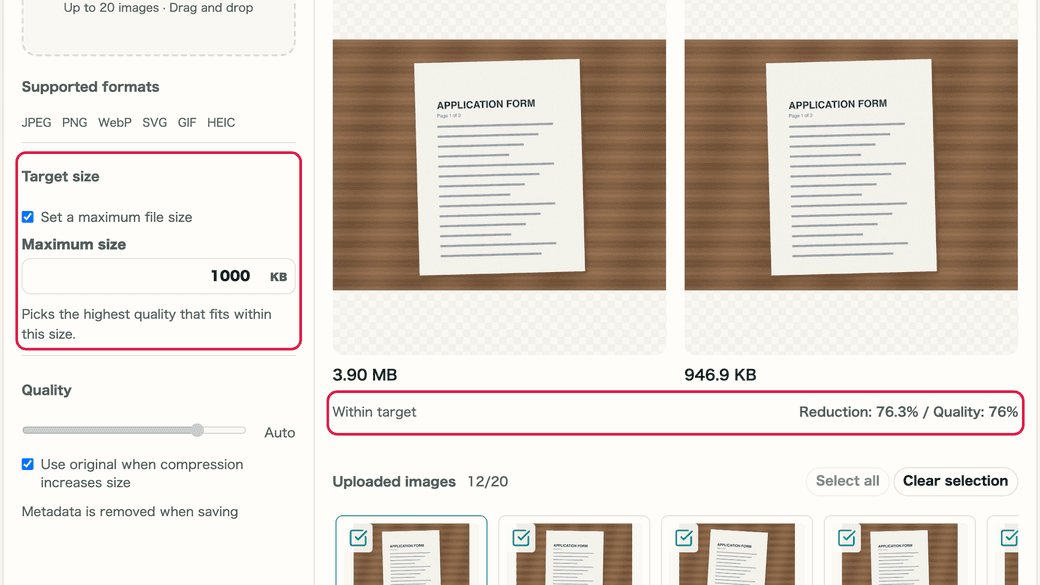
A 3.90 MB page photo became 946.9 KB Combine the photos into one PDF and check the size
Press "Open in Image to PDF", or add the compressed photos to Image to PDF yourself. Check the page order and press "Create PDF". The number of pages and the size appear under the preview. If it is over 15 MB, compress the photos to a smaller size and try again.
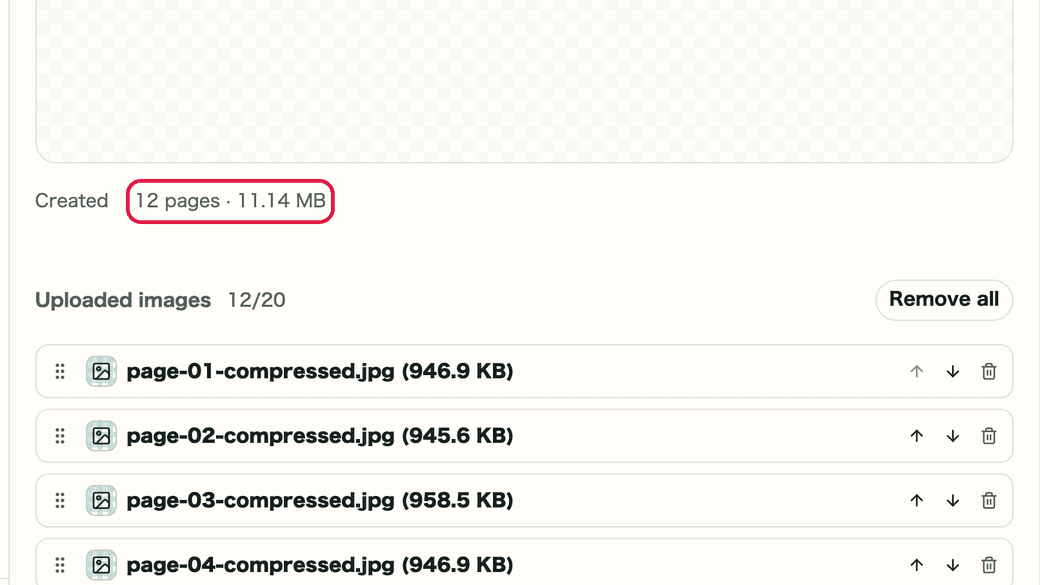
12 compressed photos made an 11.14 MB PDF
How large does a PDF of phone photos get?
We photographed a sample form in place of real tax documents and used the same 3 photos (4032 × 3024 pixels, about 3.90 MB each) to make 12 pages.
| What we did | File size | Within 15 MB per file? |
|---|---|---|
| One page photo as taken | 3.90 MB | Yes |
| 12 photos as taken, combined into one PDF | 46.90 MB | No |
| One page photo compressed with a maximum of 1000 KB | 946.9 KB (quality 76%) | Yes |
| 12 compressed photos, combined into one PDF | 11.14 MB | Yes |
Each photo fit on its own, but 12 photos as taken made a PDF over three times the limit. After compressing each photo to under 1 MB, the same 12 pages fit in one PDF.
File sizes depend on what is in the photo, so use these numbers as a guide.
Official guidance
| Source | Details | Checked |
|---|---|---|
| IRS, "IRS Document Upload Tool" | You can upload scans, photos, or digital copies as JPGs, PNGs, or PDFs to respond to an IRS notice or letter, and get a confirmation. You need the access code if one was provided, or the notice or letter number. Do not submit tax returns through the tool. Page last reviewed August 27, 2026. | 2026-11-27 |
| IRS, "IRS expands secure digital correspondence for taxpayers" (FS-2023-05) | Taxpayers who receive a notice with a link and access code can upload scans, photos, or digital copies in JPEG, PNG, or PDF format, with a maximum file size of 15 MB per file. Up to 40 files can be uploaded, and each PDF is limited to 120 pages. The tool is not available for some documents, such as those requiring physical signatures. | 2026-11-27 |
| IRS, "Understanding your CP05A notice" | For the fastest resolution, reply with the Document Upload Tool. Screenshots, pictures, and other digital images are accepted, and your reply must include a copy of the notice. | 2026-11-27 |
| IRS, "Document Upload Tool - YouTube video text script" | Each submission can include up to 40 files of up to 15 MB each. Some special characters, such as an exclamation mark, are not allowed in file names and cause an error. | 2026-11-27 |
Where people get stuck
- No access code in your notice? You can still use the tool by entering the notice or letter number. Choosing the wrong one from the list can delay your case.
- Some notices ask you to include a copy of the notice itself. For CP05A, your reply must include it, so photograph the notice too.
- Blurry photos or pages with cut-off edges cannot be fixed by compressing. Take the photo again.
- Compressing too much can make small text hard to read. Zoom in on the result before you upload it.
- Image to PDF can combine up to 20 images at a time. For more pages, make several PDFs and join them with PDF Merge, keeping each PDF within 15 MB and 120 pages.
- Do not hide numbers or details the IRS asked for. Send the documents as requested in your notice.
- If the tool shows an error for a file, check the file name. Rename it with only letters, numbers, and hyphens, then upload it again.
Will the IRS accept the documents if the files meet the limits?
Meeting the file limits only means the files can be uploaded. Whether the documents answer the notice is decided by the IRS. We did not upload files to the IRS, so this guide follows the published guidance.
If you are not sure which documents to send, check your notice or contact the IRS at the number it lists.
Is your image sent anywhere?
No. Many handy online services first send your file to their own computers before working on it. The tools on this site don’t send your image anywhere. All the work happens on your phone or computer, so no one, including the people who run this site, can see your image.
Only if you agree to cookies, we record which tool you used, how many files you handled and whether you saved them, to improve the site. We don’t record file names or what’s in the files.
Summary
The IRS Document Upload Tool accepts JPEG, PNG, or PDF files of up to 15 MB each, up to 40 files. Photos straight from a phone usually fit as single files, but a PDF of many photos can go over 15 MB.
Before combining photos into one PDF, compress them to about 1 MB each. Then check the size of the PDF before you upload it.
Before you send it
- You have your IRS notice, with its access code if one was provided
- Each file is JPEG, PNG, or PDF
- Each file is 15 MB or smaller
- You are uploading 40 files or fewer
- Each PDF has 120 pages or fewer, and every page is readable
- You included a copy of the notice if it asks for one
Related
Read and use next
Image to PDF
Turn photos and screenshots into one PDF, one image per page.
Combine the photos into a PDF with Image to PDF
PDF Merge
Arrange several PDFs in the order you want and combine them into one PDF.
Join several PDFs with PDF Merge
Turn images and screenshots into a PDF
5 screenshots became a 5-page, 1.33 MB PDF, and the text stayed as sharp as in the original images.
Read the guide
Combine your documents into one PDF to send
We turned 3 document photos and an application form into one password-protected PDF (5 pages, 1.40 MB).
Read the guide
Split a PDF and extract pages
Taking 2 pages out of a 6-page, 6.10 MB scan gave a 2.04 MB PDF. Each page stays about 1 MB.
Read the guide